Java4Shell (CVE-2026-114938): What It Is and How to Protect Your Java Servers
High severity advisory from the Digital Edge SOC. Clients: our team is already applying mitigations; call (718) 370-3353 with questions.
A critical Java flaw lets attackers hit Jira, Jenkins, Keycloak and other Java servers without a login. Here's who is affected and the 5 steps to fix it.
What happened
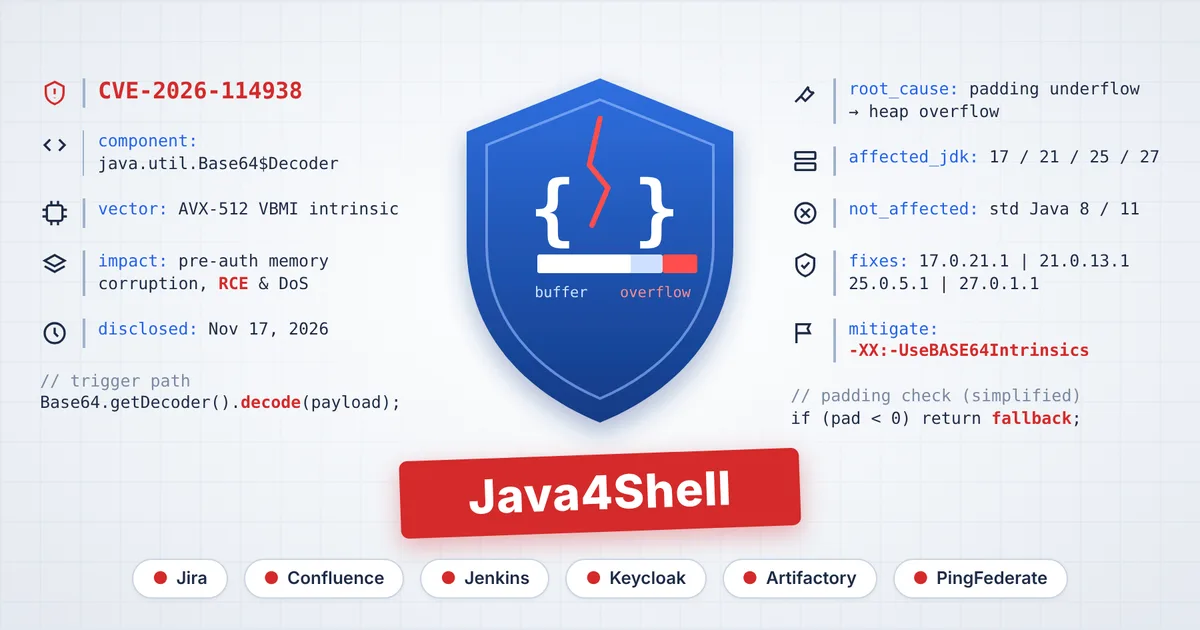
On November 17, 2026, researchers publicly disclosed Java4Shell (CVE-2026-114938), a memory-corruption vulnerability in the Base64 decoder built into the Java runtime. A specially crafted Base64 string, the kind of data found in login headers, tokens and API requests, can cause an optimized decoding routine to write past the end of its memory buffer. The outcome ranges from a crashed Java service to an attacker running their own code on the server. The researchers rate it 9.2 out of 10 (Critical) under CVSS 4.0. Oracle rates it 8.1 (High) under CVSS 3.1.Who is affected
Two conditions must both be true for a server to be exposed: - It runs Java 17, 21, 25 or 27 (OpenJDK, Oracle Java and builds based on them), and - It runs on an x86-64 processor with AVX-512 VBMI support. That includes recent Intel Xeon generations (Ice Lake and newer) and AMD Zen 4 and newer, on-premises and in the cloud. Standard Java 8 and Java 11 are not affected, and ARM-based servers are not exposed through this path.Applications confirmed at risk
Researchers confirmed the flaw can be exploited without logging in on default configurations of: - Atlassian Jira and Confluence - Jenkins - Keycloak - JFrog Artifactory - PingFederate Kafka, Solr, Elasticsearch, Gerrit and Spinnaker were also shown to be exploitable once an attacker has a login. The researchers say the list is incomplete: any Java service that decodes untrusted Base64 data on an affected runtime should be treated as in scope.Is it being exploited?
As of November 18, 2026, no in-the-wild exploitation had been reported, and the researchers are withholding their full exploit code. Security teams expect probing to begin quickly, so the safest approach is to patch before working exploits go public, not to wait and see.What to do: 5 steps
1. Inventory every Java runtime. Include runtimes bundled inside vendor products, appliances and container images, and prioritize internet-facing and identity systems. 2. Check the hardware. Flag servers whose CPUs support AVX-512 VBMI; the JVM can report this itself. 3. Mitigate where you can't patch yet. Start the Java service with -XX:-UseBASE64Intrinsics, which disables only the vulnerable code path, then restart. 4. Patch. Upgrade to Oracle Java 17.0.21.1, 21.0.13.1, 25.0.5.1 or 27.0.1.1, or your distribution's equivalent (Amazon Corretto, Azul Zulu and GraalVM have fixed builds; others are pending). For bundled runtimes, install the vendor's updated release. 5. Restart and verify. A patched JDK on disk doesn't protect a JVM that is still running. Rebuild containers from patched base images, restart every Java process and confirm the running version. While you work through the list, reduce exposure: put affected applications behind VPN, SSO or IP allow-lists, add WAF rules that reject malformed Base64 tokens, and enable the Snort detection rules released for this CVE.Download the full advisory
Our client advisory includes the version table for every major Java distribution, copy-and-paste commands for Windows, Linux and containers, detection signals for your SOC, an incident-response checklist and an action plan with owners and deadlines.
DownloadDe Client Advisory Java4shell Cve 2026 114938
How Digital Edge can help
Digital Edge's in-house Cyber Security, SOC and NOC teams can help you build a complete Java inventory and exposure assessment, roll out mitigations and patches as an emergency change, deploy WAF and IDS rules, run a compromise assessment and verify the fix end to end, with audit-ready documentation. Talk to our team: +1 718-370-3353 or sales@digitaledge.net